


We’ve all had that sinking feeling after accidentally deleted important photos or documents on our iPhone.
Maybe you were trying to free up space and accidentally deleted the wrong wedding album. Maybe your iPhone froze during an iOS update and woke up completely empty. Or maybe you accidentally dropped your iPhone, smashed its screen, and now you can’t unlock it to retrieve your contacts.
Whatever happened, the result is the same: Panic.
Today, I’m reviewing software that claims to be the "Undo Button" for these problems: Stellar Data Recovery for iPhone. I tested it to see who actually needs this, where it works, and whether their customer support is helpful when you’re freaking out.
What is Stellar Data Recovery for iPhone?
Stellar Data Recovery is a software tool designed for Windows and Mac users that scans your iPhone or iPad to find deleted files, photos, and contacts. Unlike iTunes or iCloud - which require you to wipe your phone to restore a backup - Stellar allows you selectively recover specific file types.
It not only look for photos; but also recovers:
- Photos & Videos (Camera Roll, Photo Stream, App Library)
- Messages (SMS, iMessage, and attachments)
- Chat Apps (WhatsApp, Viber, Kik, Line,WeChat)
- Contacts & Call Logs
- Notes & Voice Memos
How It Works: My Experience
I tested this software to recover the photos that I accidently deleted. I already made a video about this - you can find it on YouTube. Here is the workflow:
Step 1: Connect Your iPhone or iPad
The interface is very clean. You get two main options on the dashboard:
Recover from iPhone/iPad (what I used)
Recover from iTunes Backup (great if you have an iTunes backup file)
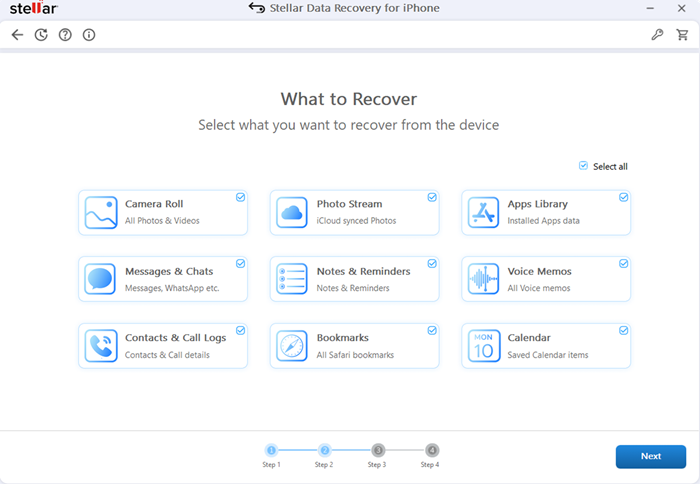
Step 2: Select File Types for Scanning
This is my favorite feature. Instead of waiting four hours to scan the whole phone, Stellar lets you tick checkboxes for exactly what you want. I selected "Camera Roll", which saved me a lot of time.
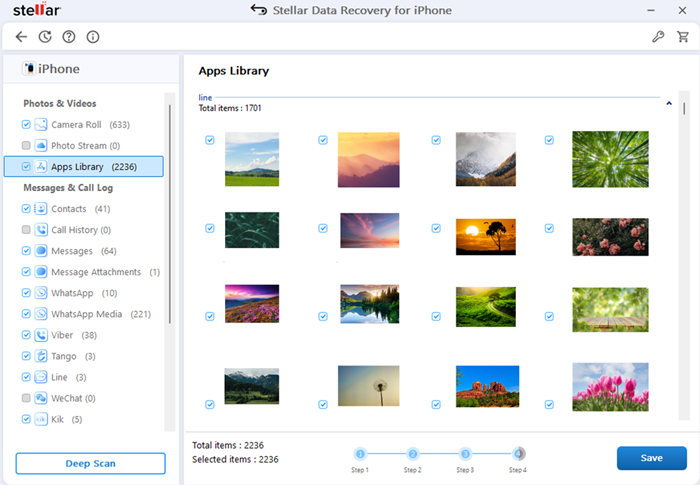
Step 3: The Preview (The Best Part)
After the scan (which took about 15 minutes for my 64GB iPhone), it didn't just give me a list of file names. It showed me thumbnails of the photos. I could actually see the deleted photos in the preview window before I paid for the software. This is crucial - if you can't see it in the preview, no software can recover it.
The Pros and Cons
Pros:
Deep Scan Capability: It found photos I deleted months ago that I thought they were gone forever.
Selective Recovery: You don't have to restore the entire iPad or iPhone. You can just recover that one missing image or message.
Encrypted Backup Support: It can access data inside iTunes backups even if they are password-protected (provided you know the password).
User-Friendly: You don't need to be a tech-savvy or programmer. It’s point-and-click.
Cons:
Scan Speed: The "Deep Scan" can be slow if you have a large storage (512GB+). You need to be patient.
UI Design: The interface looks a bit old compared to modern macOS apps, but it functions perfectly.
Cost: It’s not free. The free version only allows you to scan and preview the files. You need to buy a license to actually save the files to your computer.
Who Is This Software Actually For?
You might think data recovery software is only designed for tech people or repair shops. But after using it, I realized it’s actually designed for three kinds of users. Do you fit one of these?
The "No Backup" User (Most of Us): You meant to set up iCloud, or your storage was full, so your phone hasn't backed up in months. If you lose data, this software is your only safety net.
The Content Creators, Photographers, and Bloggers like me: You shoot videos and photos for a living. Losing a day's worth of photos or footage because of a glitch isn't just annoying - it costs you money. Creators use Stellar to pull raw files directly from the device.
Small Business Owners and Repair shops: You keep invoices, client contracts, and chats on WhatsApp. Losing those messages is a legal nightmare. This tool helps retrieve those specific timestamps and chat logs.
Their Customer Support
Stellar is a big company, not a solo app developer.
They offer 24/5 support (Monday to Friday). If you get stuck during a scan on a weekday, you can actually call them.
Even before making a call, their website has a huge list of helpful articles.
Knowing there is a phone number to call gives you peace of mind, especially when you are dealing with precious photos or messages.
Frequently Asked Questions (FAQ)
Q: I’m not tech-savvy. Is this tool hard to use?
A: Not at all. It’s designed for everyday users. The interface is simple: Plug in the phone. select the method, choose what you want to recover, click Scan, choose Photos, and click Save.
Q: Can I see my photos before I pay?
A: Yes! This is the most important feature it offers. The free download lets you connect your iPhone, run a full scan and view thumbnails of your lost files. You only pay if you see the photo you want to recover.
Q: Does it work on the latest iPhone models like 16/15 running the latest iOS?
A: Yes, Stellar updates the software constantly to support the newest iPhones models and iOS versions.
Q: Is my privacy safe?
A: Yes. The software runs locally on your computer and does not require an internet connection to process your phone recovery data. It does not upload your photos or messages to the cloud, so your private data stays private.
Final Verdict: Is it Worth It?
If you have lost critical data - such as office documents, wedding photos, business contacts, or legal text message - Stellar Data Recovery is absolutely worth for your investment.
The ability to preview files for free makes it a risk-free test. Download it, run the scan, and see if your files are there. If they are, paying the $39.99 to $59.99 is a small price to pay to get your digital files back.
My Rating: 4.5/5 Stars
Ready to Recover Your Data?
If you are sitting there staring at an empty photo album, stop using your phone immediately (so you don't overwrite the data) and give this a try. It’s reliable, it’s safe, and frankly, getting those photos and files back is worth every penny.
Download Stellar Data Recovery for iPhone Here